对拍 介绍 当我们写完一段代码但不确定对不对的时候,就可以来个对拍来看看代码的正确性。如果代码有大问题,那马上就可以知道了,但如果代码只是有点小问题,那就要看运气了。
对拍就是用 AC 代码来检查你代码的正确性,那问题来了,我要能 AC 还要对拍干啥。注意,一道题目我们之所以不能写出 AC 代码很大原因是题目的数据范围一般都是 1e5 这个级别的,但我们对拍是可以自己控制数据范围的,所以这时候我们完全可以写一个完全暴力的伪 AC 代码出来,这样就可以对拍了
应用 我们要开四个代码出来,分别命名为 test, ac,data,dp(这里是 C++代码)
test 这个就是我们自己写的代码,直接复制粘贴就可以了
ac 这个就写一个暴力就可以了,但要注意暴力的数据范围,暴力的数据范围就是我们 data.cpp 生成的数据范围
data 这个就是用来生成随机数的
这里有简单 的和复杂 的两个版本
简单 1 2 3 4 5 6 7 8 9 10 11 12 13 14 15 #include <bits/stdc++.h> using namespace std;using ll = long long ;int main () srand (time (0 )); int n = rand () % 100 + 1 ; cout << n << '\n' ; for (int i = 1 ; i <= n; i++){ int x = rand () % 100 + 1 ; cout << x << ' ' ; } cout << '\n' ; return 0 ; }
这里的核心就是
1 2 srand (time (0 ));int n = rand () % 100 + 1 ;
srand()用于初始化随机数生成器的“种子”;
time(0) 返回当前系统时间距离 “纪元”(通常是 1970 年 1 月 1 日)的秒数 (整数)
这样rand()就可以生成随机数了,再通过取模运算来确定数据范围
但rand()的随机性不强,有一定的周期性,同时 rand() 生成的数的范围通常是[0, 32767]
但对于我们对拍是够用了
复杂 1 2 3 4 5 6 7 8 9 10 11 12 13 14 15 16 17 18 19 20 #include <bits/stdc++.h> using namespace std;using ll = long long ;int main () random_device rd; auto now = chrono::system_clock::now ().time_since_epoch ().count (); mt19937_64 gen (rd() ^ now) ; uniform_int_distribution<ll> dist (1 , 100 ) ; int n = dist (gen); cout << n << '\n' ; for (int i = 1 ; i <= n; i++){ int x = dist (gen); cout << x << ' ' ; } cout << '\n' ; return 0 ; }
这里核心就是
1 2 3 4 5 random_device rd; auto now = chrono::system_clock::now ().time_since_epoch ().count ();mt19937_64 gen (rd() ^ now) ;uniform_int_distribution<ll> dist (1 , 100 ) ;int n = dist (gen);
random_device rd提供一种初始种子
mt19937_64 gen(rd()); mt19937_64 gen 是一个随机数生成器
正常来说这样就可以生成随机数了,但在 devc++中因为编译器版本问题无法实现随机数
这时就要auto now = chrono::system_clock::now().time_since_epoch().count();来帮忙了
它可以获取当前系统时间距离纪元(epoch)的时间计数值,用它来随机种子就可以了,也就是写成mt19937_64 gen(rd() ^ now);
uniform_int_distribution<ll> dist(1, 100); 用于生成均匀分布的整数,配合我们调整好的 gen 就可以生成随机数了int n = dist(gen)
排列 我们经常会遇到题目数据是一个排列的情况,这时候我们也可以输出一个随机排列出来
1 2 3 4 5 6 7 8 9 10 11 12 13 14 15 16 17 18 19 20 #include <bits/stdc++.h> using namespace std;using ll = long long ;int main () random_device rd; auto now = chrono::system_clock::now ().time_since_epoch ().count (); mt19937_64 gen (rd() ^ now) ; uniform_int_distribution<ll> dist (1 , 100 ) ; int n = dist (gen); cout << n << '\n' ; vector<int >perm (n+5 ); for (int i = 1 ; i <= n; i++)perm[i] = i; shuffle (perm.begin () + 1 , perm.begin () + 1 + n, default_random_engine (now)); for (int i = 1 ; i <= n; i++)cout << perm[i] << ' ' ; cout << '\n' ; return 0 ; }
这里的核心就是 shuffle(perm.begin() + 1, perm.begin() + 1 + n, default_random_engine(now));
shuffle 用于随机重排容器中指定范围的元素,最后一个参数就是随机数引擎,确保排列的随机
dp 这个代码就是把我们的 test,ac,data 代码串起来,达到对拍的作用
1 2 3 4 5 6 7 8 9 10 11 12 13 14 15 16 17 18 19 #include <bits/stdc++.h> using namespace std;int main () int t = 0 ; while (1 ){ t++; system ("data.exe > data.in" ); system ("test.exe < data.in > test.out" ); system ("ac.exe < data.in > ac.out" ); if (system ("fc test.out ac.out > diff.log" )){ cout << "WA " << t << '\n' ; break ; } cout << "AC" << '\n' ; } return 0 ; }
system("data.exe > data.in"); 通过系统命令行运行 data.exe 程序,并把它的输出内容重定向到 data.in 文件里面。通俗的说就是把 data.cpp 的输出复制到 data.in 这样一个 txt 文件里面
system("test.exe < data.in > test.out"); 和上面一样,就是把 data.in 的内容输入到 test.cpp 中,再把 test.cpp 的输出复制到 test.out 这样一个 txt 文件里面
sysytem("ac.exe < data.in > ac.out"); 同理
system("fc test.out ac.out > diff.log"); 这里就是把 test.out ac.out 进行对比,然后把比较结果保存到 diff.log 文件里面
也就是说,我们的 dp.cpp 就是把我们在 data.cpp 生成的随机数输入到 test.cpp(我们写的不确定的代码)与 ac.cpp(我们比赛的时候的小数据暴力代码 或者 赛后找到的大数据 ac 代码)里面,然后把他们的输出进行对比
这里可以把’\n’换成 endl 这样就可以实时看到我们喜欢的 AC,然后一个 WA(qwq)(有时候这样好像也没有用)用 ‘\n’就是一直没有输出,然后所有的 AC 和 WA 一起弹出来,这个可以自己感受一下
这都是小菜,重要的是 WA 的数据,这个当我们的 dp.exe 输出 WA 的时候就可以在文件夹的 data.in 里面看到数据,然后在 diff.log 里面看到正确的输出和我们错误的输出
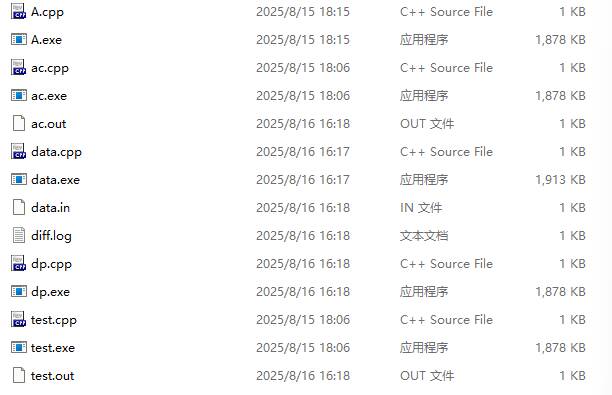
注意我们文件放的位置,我们的 dp.cpp 只能打开和它同级的文件或文件夹,(同级就是说在一个页面里面的)如下就是都是同级的
所以说如果在管理文件的时候exe 文件 被放到一个文件夹里,那在system("data.exe > data.in"); 这里要用到exe 文件 的地方就要写成system("exe\\data.exe > data.in"); 这里就是我的exe 文件 都放到了叫exe 文件夹 里面,也就是exe 文件夹 是和 dp.cpp 同级的
后文 注意我们的 data.cpp 在面对有多测的题目时候,只要多输出一行 1 就可以了
注意我们的 dp.cpp 运行后一直输出 AC,没有 WA 的输出,那也不能说我们的代码一定对了,这时候我们的代码有可能有一点小问题,这是要看生成随机数的运气的,看能不能生成出那个错误的数据
我们可以输出绿色的 AC,红色的 WA,但只能在黑框框里面实现,重定向输出就不行了,下面会在样例的 dp 里面显示
样例 比如题目要输出 a + b 的值, 我们就可以这样写对拍
test 1 2 3 4 5 6 7 8 9 10 11 12 13 14 #include <bits/stdc++.h> using namespace std;int main () ios::sync_with_stdio (0 ); cin.tie (0 ); int a, b; cin >> a >> b; if (a % 2 && b % 2 )cout << a + b + 1 << '\n' ; else cout << a + b << '\n' ; return 0 ; }
ac 1 2 3 4 5 6 7 8 9 10 11 12 #include <bits/stdc++.h> using namespace std;int main () ios::sync_with_stdio (0 ); cin.tie (0 ); int a, b; cin >> a >> b; cout << a + b << '\n' ; return 0 ; }
data 1 2 3 4 5 6 7 8 9 10 11 12 13 14 15 16 #include <bits/stdc++.h> using namespace std;using ll = long long ;int main () random_device rd; auto now = chrono::system_clock::now ().time_since_epoch ().count (); mt19937_64 gen (rd() ^ now) ; uniform_int_distribution<ll> dist (1 , 100 ) ; int n = dist (gen); int m = dist (gen); cout << n << ' ' << m << '\n' ; return 0 ; }
dp 注意上文说的文件位置
1 2 3 4 5 6 7 8 9 10 11 12 13 14 15 16 17 18 19 20 21 22 23 24 #include <bits/stdc++.h> using namespace std;#define red "\033[31m" #define green "\033[32m" #define reset "\033[0m" int main () ios::sync_with_stdio (0 ); cin.tie (0 ); int t = 0 ; while (1 ){ t++; system ("data.exe > data.in" ); system ("test.exe < data.in > test.out" ); system ("ac.exe < data.in > ac.out" ); if (system ("fc test.out ac.out > diff.log" )){ cout << red << "WA " << t << reset << '\n' ; break ; } cout << green << "AC" << '\n' ; } return 0 ; }
这样运行 dp.cpp 后就会在某一个时刻输出 WA 并停止,这时候我们打开我们代码存放的文件夹,然后打开 data.in 就可以看到数据,diff.log 里面看到我们的输出和正确输出